


Carol for Chrome - Chrome Extension
Browser extension for easy ChatGPT access.
User Rating
3.0
Score
60
Free/Trial Support
Supported
Features
4 Features
Last Updated
Feb 16, 2026
What is Carol for Chrome?
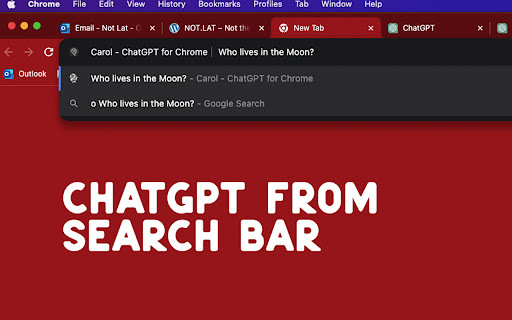
Carol for Chrome is a browser extension that provides easy access to ChatGPT. It allows users to interact with ChatGPT directly from their browser without needing to sign up. It offers quick access via the search bar, a universal shortcut, and contextual interaction through right-clicking selected text.
How to use Carol for Chrome?
Use 'O' before your question in the search bar, use CTRL+SHIFT+O (Windows) or CMD+SHIFT+O (Mac) for a new tab, or right-click selected text to send it to ChatGPT.
Top Features
- Quick ChatGPT access via search bar
- Universal ChatGPT shortcut
- Easy contextual interaction
Pros & Cons
No Data
Use Cases
- Quickly launch ChatGPT conversations from the search bar.
- Open a new ChatGPT tab from anywhere with a keyboard shortcut.
- Send selected text from a webpage to ChatGPT for context-specific insights.
User Groups
No Data
Carol for Chrome Pricing
Free PlanSubscription Plan
No detailed pricing information available


Cover Preview
CAROL FOR CHROME Features
- AI Chatbot functionalityAI Chatbot
- AI Productivity Tools functionalityAI Productivity Tools
- AI Assistant functionalityAI Assistant
- AI Browsers functionalityAI Browsers